From PDF to QuickBooks — Construction Bills Coded, Approved, and Accurate
upmarkPDF is pre-accounting software that helps construction teams manage accounts payable. AI-powered OCR captures vendor-bill data; your team assigns job and cost codes, routes bills for approval, and exports reviewed data to QuickBooks Online. Built-in retainage and markup tools help keep transaction details accurate.
How It Works
Four steps from bill receipt to QuickBooks export
Upload to Queue
Email bills to your dedicated bill queue at upmarkPDF. Or, upload directly from your device.
AI-Powered Data Extraction
Our OCR reads vendor bills and extracts key fields. Your team reviews the results, confirms the suggested job and cost code, and applies billable markup when needed.
Route for Approval
Send bills through your approval chain with a single click. Reviewers can approve, reject or make changes on the fly. Track every bill's status — Pending, Reviewed, Approved — in real time.
Sync to QuickBooks Online
Export approved bills directly to QuickBooks Online. No re-entry needed. Exports include all line items, attachments, reviewer actions and memos. Your books stay current and your team stays focused on the work that matters.
What is upmarkPDF?
upmarkPDF is a 'pre-accounting' tool built for teams that job-cost. Email transactions to your organization's shared queue, where AI extracts vendor and line-item details from PDFs, JPEGs, and PNGs automatically. Your team confirms the suggested cost code and then approves bills to sync with QuickBooks Online — all without re-keying a single number.
What makes upmarkPDF unique is the depth of coding options. With upmarkPDF you can mark bills with cost codes or choose from your Chart of Accounts—or both in the same transaction. And, you can code bills against job-specific budget lists. Mark line items as billable, apply a markup percentage, and handle retainage with a single 'click'.
upmarkPDF is built to save time, reduce errors, and keep your whole team on the same page — And it's free to try.
Built for the Full Bill Lifecycle
Everything your team needs to go from bill receipt to QuickBooks — without the chaos
Bill Queue
Every bill your team receives lands in a shared queue. No more emailed attachments or paper piles — your whole team sees what's in, what's in progress, and what's done.
OCR & AI Extraction
AI-powered OCR and Deterministic Rules reads vendor names, invoice totals, and line items the moment a bill is uploaded. Eliminate manual data entry and the errors that come with it.
Budget Lists & Cost Codes
Sync your vendors, cost codes, COA, projects and terms from QBO once with a single click — they're instantly available to your whole team. No need for complex mapping. upmarkPDF copies all of your lists in seconds.
Billable & Markup Columns
Mark a transaction as billable to a job with one click. And, add a markup percentage directly to an entire bill, or to individual line items. Full control and flexibility.
Approval Workflows
Route bills through a structured review and approval chain. Every stage — who recorded the bill, who reviewed it, who approved it — is logged, visible and recorded.
Retainage Calculations
Set your retainage percentage or dollar value and upmarkPDF computes the retained amount and what's due for payment — all shared cleanly with QBO.
QuickBooks Online Sync
Export approved bills directly to QuickBooks Online. Your books stay current without re-entering data, and your accounting team always has what they need.
Team Collaboration
Cost codes, budget lists, vendors, and approval settings are shared organization-wide. Everyone works from the same data — no more version control headaches.
Still chasing bill approvals over text and email?
upmarkPDF builds a structured approval chain directly into your bill processing workflow. Send bills to reviewers with one click. Every stage — upmarked, reviewed, approved — is logged and visible to the whole team.
- AI automatically extracts vendor, amounts, and line items from uploaded bills — less data entry, fewer errors
- Routing rules determine who reviews next — each user just follows the prompt to pass the bill forward
- Full audit trail: who upmarked, reviewed, and approved
- Real-time status visible across your team
- Approved bills go straight to QBO with one click
Fields locked by default in Reviewer Mode. If something looks off, reviewers can unlock, correct it on the spot, and pass it forward. Or, they can reject the bill and send it back to the creator for bigger changes.
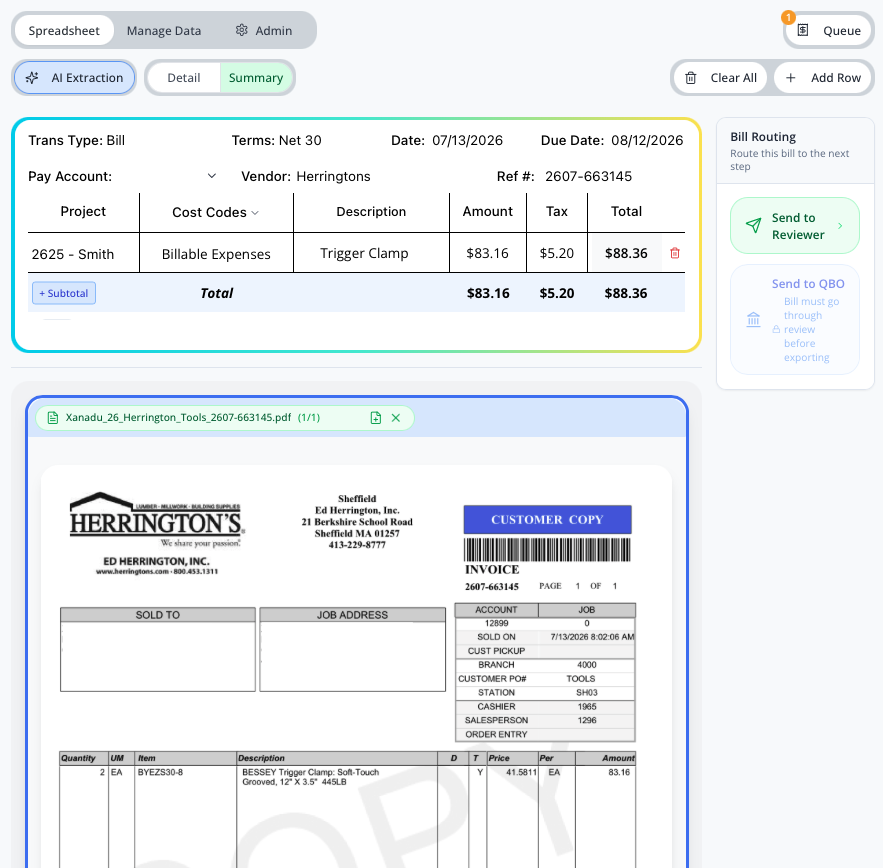
The bill creator applies cost codes, markup, and project data alongside the original PDF — then routes it for review with one click.
See the Platform in Action
Every bill your team receives lands in one shared queue — organized by status, stage, and owner.
Simple, Transparent Pricing
Start free. Upgrade as your team grows.
- QBO API sends (2/day, org-wide)
- 1 Budget List
- OCR bill extraction (4/day, org-wide)
- Custom onboarding
- QBO API sends (20/day, org-wide)
- 3 Budget Lists
- OCR bill extraction (40/day, org-wide)
- Custom onboarding
- QBO API sends (60/day, org-wide)
- 10 Budget Lists
- OCR bill extraction (120/day, org-wide)
- Bill Queue
- Billable & markup columns
- Routing & approval workflows
- Retainage tracking
- Bookkeeper Access
- Priority support
- Custom onboarding
- QBO API sends (100/day, org-wide)
- 50 Budget Lists
- OCR bill extraction (200/day, org-wide)
- Bill Queue
- Billable & markup columns
- Routing & approval workflows
- Retainage tracking
- Bookkeeper Access
- Priority support
- Custom onboarding
Serving Multiple Clients?
If you're running a bookkeeping firm, apply for accountant access. Accepted firms receive Team plan features at no cost. Consolidate your client work and speed your bill-processing. Free onboarding included.
Single sign-in
One login gives you access to every client workspace. No juggling accounts.
Per-client workspaces
Each client's cost codes, budget lists, and bills are completely separate and secure.
Unified bill view
See all open bills across every client from one dashboard. Nothing falls through the cracks.
Meet the Founder
Avi Edelson
I run a construction bookkeeping firm and I've spent years watching businesses twist themselves in knots job-costing bills by hand, managing complex approval workflows and manually adding transactions to QuickBooks Online. The workarounds are similar: elaborate folder systems, email chains, automations that require constant tinkering. Almost without exception, these create bottlenecks and confusion. I built upmarkPDF because there had to be a better way to get bills where they belong, fast.

Security—built in
upmarkPDF includes best-in-class security to keep your account safe. In addition to 2FA for all users we use Stripe as our payment gateway—ensuring that your payment history, cards-on-file and contact information is protected by the industry's leading processor. On the backend our software is shielded by multiple tiers of security, including RLS, granular RBAC, Dual-Pool architecture, OIDC/OAuth and numerous other safety and security measures helping to ensure maximum uptime for everyone. We are fully committed to investing in the best software security so we can provide the safest and most stable platform possible.
Ready to Bring Your Bill Workflow Into One Place?
Queue, cost-code, approve, and export to QuickBooks Online — all from a single platform. Free to start.